fleet-sprint: What It Does, What You Bring, and How You Watch It Work
A first-look guide for teams that have a git repo, a backlog in Azure DevOps or GitHub Issues, and Claude Code already working — and have never touched apra-fleet.
Section 1What fleet-sprint does
fleet-sprint is a program that runs a full development cycle on your codebase without a person driving each step. You give it a scoped batch of work (a set of issues with clear acceptance criteria), a git branch to work on, and at least one registered machine running an AI coding agent. It then runs, in a loop, until the work is done or it hits a limit you set:
- Plan. An AI "planner" reads your issues and breaks them into small, concrete tasks — each with written acceptance criteria and an explicit dependency order. A second AI ("plan-reviewer") checks that plan for coverage, task size, and testability before anything is built. The plan is not a document; it is written directly into the issue tracker, so every later step reads the same source of truth.
- Develop and review. An AI "doer" implements the tasks — real code, real commits on your branch, one commit per task. After each round, a separate AI "reviewer" diffs the branch against the acceptance criteria and either approves or sends specific tasks back with reasons. The reviewer can reopen tasks; the engine (deterministic code, not an AI) applies every state change, so nothing is closed on an AI's say-so alone.
- Deploy and integration-test (only if you provide the runbooks — see Section 2). A "deployer" follows your written deploy instructions to stand the software up, and an "integration test runner" follows your written test playbook to verify features end-to-end against the running software. Features are only marked done on passing evidence; failures become new bug issues that feed the next cycle.
- Evaluate. The engine looks at real issue-tracker state and decides: done, or run another cycle (up to a ceiling you set, default 5).
When the loop ends, a finalization pass runs: a reviewer renders an evidence-based PASS or FAIL verdict for the whole sprint, a "harvester" writes durable documentation and the sprint analysis, an optional once-per-sprint regression pass runs your regression playbook, and the engine pushes the branch and opens a pull request whose title and body state the verdict plainly, with a cost breakdown. If the branch already has an open PR (a relaunch), every sprint end rewrites that PR's title and body to the latest verdict and keeps earlier runs in a short run history. It never merges the PR — that is always a human decision.
Concretely, after a run finishes, here is what has changed in your world:
- Your repo has a new branch with a series of reviewed commits and an open PR against the base branch you chose.
- Your issue tracker (beads — see Section 2) has the sprint's issues decomposed, worked, and closed-with-evidence or left open with filed bugs explaining why.
- A sprint analysis document is written to the harvester member's working tree (
docs/sprint-analysis-<branch>-<hash>.md:/in the branch name becomes-, plus an 8-character hash) but never committed -- the engine listsdocs/sprint-analysis-*.mdin that clone's.git/info/exclude-- and the run's raw log is retained on disk. NoCHANGELOG.mdentry is written; the cost breakdown is in the PR body.
What it is not: it does not invent product scope (the planner is explicitly forbidden from adding work beyond the issues you gave it), it does not merge its own PRs, and it does not know how to deploy or verify your software unless you write down how (Section 2).
Section 2What you need before you start
This is the honest part. fleet-sprint automates execution; it does not automate knowing your project. Four things are yours to build first, and none of them are generated for you.
2.1 Your Azure DevOps / GitHub Issues epics need equivalents in beads
fleet-sprint tracks all work in beads (bd), a git-friendly issue tracker: the data lives in your repo clone and syncs through your existing git remote, no extra server. That is where the sprint's plan gets written, where acceptance criteria live, and where closure evidence is recorded. For this guide, that is all you need to know about beads internals.
Before a sprint can run, the work in scope must exist there: one epic bead as the sprint root, with the in-scope features/stories as its children (created or linked with --parent — the engine resolves a sprint's scope by following parent links from the root id you launch with).
Getting your backlog in is better than we expected: beads ships native integrations for both Azure DevOps and GitHub Issues, built on a common sync engine.
Azure DevOps. bd ado sync --pull-only bulk-pulls work items from an AzDevOps org/project, bd ado pull fetches specific items. Configured via bd config or env vars: organization, project, PAT.
GitHub Issues. bd github sync synchronizes issues, and it is bidirectional by default — it pulls new/updated issues from GitHub into beads and pushes local beads issues back to GitHub. Constrain the direction explicitly until you know you want two-way traffic:
bd config set github.token  "$GITHUB_TOKEN"   # or env: GITHUB_TOKEN
bd config set github.owner  "your-org"        # or env: GITHUB_OWNER
bd config set github.repo   "your-repo"       # or env: GITHUB_REPO

bd github sync --pull-only        # GitHub -> beads only (start here)
bd github sync --dry-run          # show what would sync, change nothing
bd github pull  <refs...>         # fetch specific issues
bd github status                  # current config + sync status
Useful flags on bd github sync: --issues (comma-separated bead ids) and --parent (limit a push to one bead and its descendants) to scope a sync, and --prefer-newer (the default), --prefer-github or --prefer-local to settle conflicts. GitHub Enterprise is supported via github.url / GITHUB_API_URL.
For anything else, the generic bd import accepts JSONL on a file or stdin (title is the only required field; external_ref / source_system carry cross-system ids). All of the above was checked against the installed bd CLI (bd github --help, bd github sync --help, bd ado --help, bd import --help) and the beads documentation.
Two honest caveats.
- This is upstream beads functionality, not something apra-fleet adds or wraps — apra-fleet knows Azure DevOps and GitHub only as git hosts (credential provisioning for push/PR). Validate the sync against your own org before relying on it, and prefer
--pull-only/--dry-runon the first run, sincebd github syncwill otherwise push your beads back into GitHub. - An imported work item is not automatically sprint-ready: most AzDevOps and GitHub issues lack the concrete acceptance criteria every sprint role depends on — the planner decomposes from them, the doer is instructed to skip beads without them rather than guess, and the reviewer diffs against them.
So the real work is curation, not transcription: parent the in-scope items under one root and write down what "done" looks like for each. One epic with 3-8 well-described children is enough for a first sprint.
2.2 Write deploy.md — fleet-sprint cannot write it for you
deploy.md lives at your repo root and is a literal runbook: the deployer agent reads it and executes it, command by command. Its contract (from the deployer's own role definition):
## Deploy— the commands to deploy/stand up the software, in order.## Smoke test— one command; exit code 0 means healthy.## Permissions(optional but recommended) — the command prefixes the agent needs allowed in its CLI permission settings. The deployer checks this before running anything and stops with a clear report if your allowlist is missing entries, rather than failing mid-deploy.- A sandbox / isolated test-deploy mode (optional) — if
deploy.mddistinguishes one from its production deploy, sprint-dispatched deploys (always for integration/regression testing) use it, leave the instance running for the test phase, and your test playbooks own its teardown. Every phase's dispatch prompt carries the sprint's ownsprintIdline, so a runbook can key the instance's location on it.
Write every step as plain commands. Recent Claude Code CLIs in headless mode refuse shell for/while loops and $(...) command substitution even when each inner command is allowed, and every sprint role is told not to write them. If a step needs that logic, put it in a script in your repo and call the script.
The deployer is explicitly forbidden from improvising: if deploy.md is absent, the deploy and integration-test phases are skipped cleanly — the sprint still runs, but nothing gets verified against a running system. If a step fails, it stops and reports the exact command and output; it never "works around" your deploy process.
Why you must write it: fleet-sprint has no idea whether your app is a Docker compose stack, an IIS site, a Kubernetes deployment, or npm start — and guessing at deployment is exactly the class of action you do not want an autonomous agent doing. Minimum viable version: the commands you already run by hand to start the app locally, plus one curl or CLI call that proves it is up.
2.3 Write an integration test playbook and a regression test playbook
These are instruction files a human writes, not test code. They tell the test-runner agents how to verify the software works. If you have zero automated tests today — which is our assumption about you — that is workable: a playbook can start life as written-down manual verification steps (commands to run, outputs to check), and grow more automated over time.
integ-test-playbook.md (repo root) — read every cycle by the integration test runner after a successful deploy. It describes how to exercise the deployed software and how to judge pass/fail. The runner closes a feature only when its tests pass, files a bug bead (with expected vs actual, output, and repro steps) when they fail, and never writes or fixes code itself. Note the division of labor: per-feature test code is written during the sprint by the doer (the planner creates a [test] task for every feature); the playbook is the stable, environment-level "how do we run and verify things here" document. Minimum viable version: a ## Permissions section, how to reach the deployed app (URL/port/paths), and how to run and interpret whatever checks exist — even if that is three curl commands and what their responses should contain.
regression-test-playbook.md (repo root) — run once per sprint, near the end, by a separate regression runner. The playbook decides its own structure: the runner runs every part it defines, in its order, and reports each part under the playbook's own name for it. ## Setup and ## Teardown are optional; a ## Teardown always runs, pass or fail, and a failed ## Setup skips only the parts that depend on it. Its job is proving existing functionality still works. Two honest softeners for a team starting from zero: (a) its result is explicitly informational — it never gates the sprint's PASS/FAIL verdict; failures are filed as standalone "carry-over" bugs for a future sprint; and (b) if the file is absent, the phase is skipped with a warning. You can also skip it for one sprint on purpose ("phases": {"regression": "skip"} on the launch request); the skip is logged and stated in the PR body. So you can defer this one — but a sprint with no regression pass has no systematic check that it didn't break what already worked, and with no unit tests either, your only safety nets are the reviewer's diff reading and your own PR review. Plan to add it by your second or third sprint.
2.4 Register at least one fleet member
A member is a real machine (or just a separate folder on your machine) with a provider CLI — for you, Claude Code — and a working directory containing a clone of your repo. The fleet server dispatches all agent work to members.
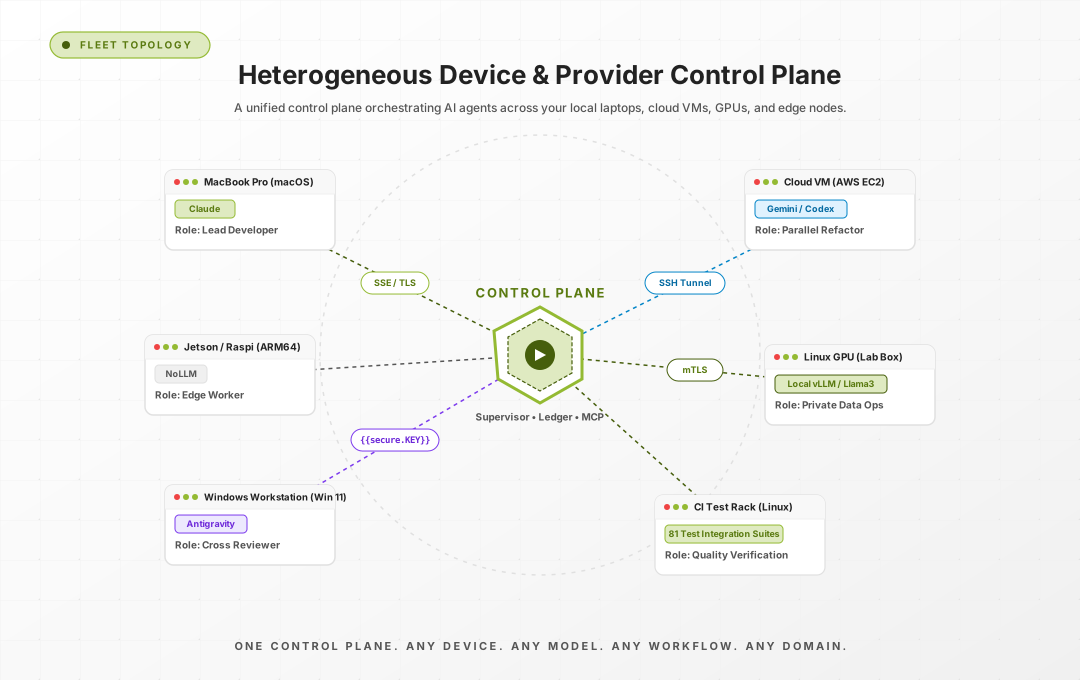
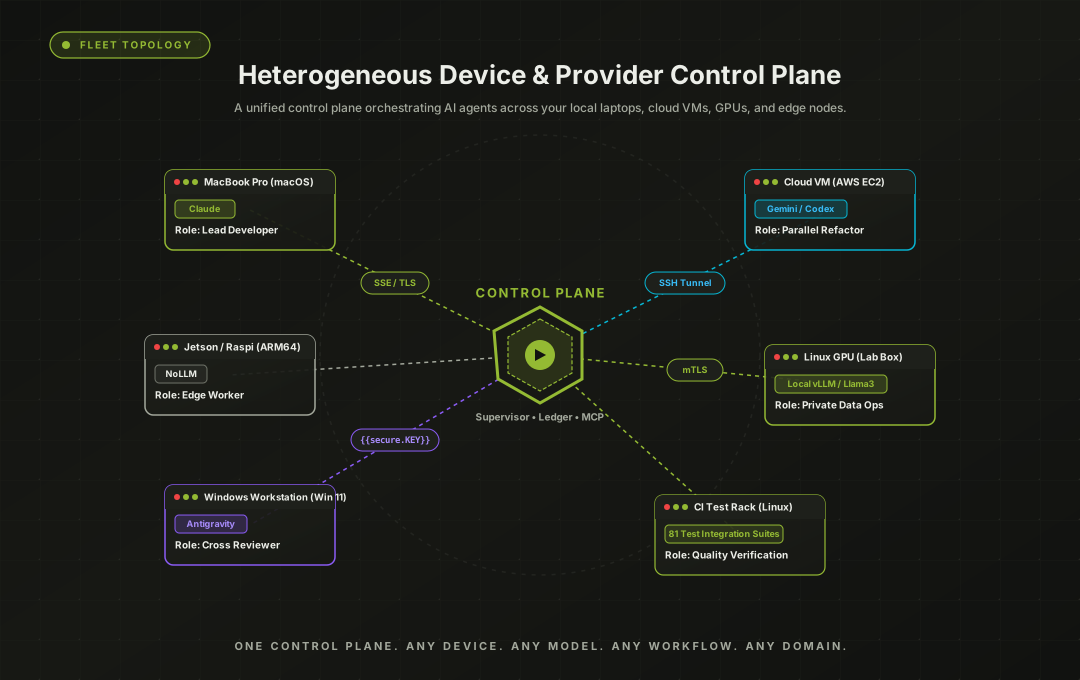
fleet-sprint ships inside the @apralabs/apra-fleet package. It needs a system Node.js 22.16+ and npm on PATH; the installer checks this first and stops, changing nothing, if either is missing. Install it from npm:
npm install -g @apralabs/apra-fleet
apra-fleet install    # installs for Claude Code (default)
apra-fleet start      # npm install registers no OS service: start the server
Alternatively, download the standalone installer for your platform from GitHub Releases (apra-fleet-installer-darwin-arm64, apra-fleet-installer-darwin-x64, apra-fleet-installer-linux-x64, apra-fleet-installer-win-x64.exe; per-OS download commands in docs/install.md) and run it — installation is the default action, and it registers and starts a user-level service, with the apra-fleet binary in ~/.apra-fleet/bin (not added to PATH; PowerShell: & "$HOME\.apra-fleet\bin\apra-fleet.exe" status). Either way, fleet-sprint is installed into ~/.apra-fleet/workflows/fleet-sprint.
Every member a sprint uses needs bd (beads) runnable in its work folder; the install provides it (it needs npm on that machine). A member without bd fails the sprint's preflight before any work is dispatched, with an error naming the member and the fix.
Then load the fleet MCP server in Claude Code (/mcp) and register members conversationally — registration is driven through your agent in plain language, e.g. "Register a local member called dev1, work folder C:\work\myapp." Registration validates connectivity and that the CLI is present; remote machines work over SSH, with passwords collected out-of-band (never typed into the chat).
One member is enough to start, and a single-member sprint avoids the multi-clone topology questions entirely. You will also want git credentials provisioned for the member so it can push the branch and open the PR — apra-fleet's provision_vcs_auth supports GitHub, Bitbucket, and Azure DevOps (org URL + PAT), so a GitHub- or AzDevOps-hosted git repo is fully supported. For a GitHub repo, opening the PR needs a GitHub App configured on the fleet (setup_git_app, see GitHub App setup): with only a PAT the sprint pushes the branch but logs [Publish PR Skipped] ... GitHub App not configured and opens no PR.
2.5 Scale sideways: one member per sprint, several sprints at once
The way to get more work done in parallel is more sprints, not more agents inside one sprint. Register several members and run a separate sprint on each — one member, one branch, one slice of the backlog per sprint. Three members running three independent sprints is a configuration that gets real daily use.
The supervisor is built for exactly this: it holds a reservation ledger over members and issue scopes, refuses a launch whose member or issue scope collides with an already-running sprint (HTTP 409 naming the conflict), and shows a member as reserved in the launch form while it is busy. Each sprint gets its own branch, its own PR, and its own dashboard, so the runs stay independent all the way to review.
Assigning several doers to a single sprint is a different thing, and an untested one — the launch form will let you tick several members for one sprint, but that configuration has not been exercised in practice, so treat it as experimental. Start with one member per sprint and add sprints, not doers.
2.6 Prepare the member before your first sprint
A fleet member is a folder you already use for day-to-day development. fleet-sprint assumes its environment works — compilers, SDKs, package managers, services — and does not guess which tools your project needs.
To prepare it, do one interactive dry run before the first sprint on a member: ask Claude to deploy the project on that member in the deployer role (following your deploy.md), or to run the integration tests in the integration test runner role (following integ-test-playbook.md). This runs the real toolchain; Claude usually fixes the environment or tells you exactly what to install. Environment setup belongs to these roles, not to sprint doers, which stay inside the repo's working copy. On Windows, an installer that needs admin rights shows a UAC prompt for you to approve.
Manual edits. Commit any manual change in the member's folder before the next sprint, ideally with a short note in the relevant bead. If uncommitted changes block the sprint from checking out its branch, the sprint saves all of the folder's uncommitted changes (untracked files included, not only the blocking ones) into a git stash named fleet-sprint[<branch>] auto-stash of orphaned WIP blocking branch ensure and continues. (On a multi-member launch, a member with any uncommitted changes has them stashed as fleet-sprint[<branch>] auto-stash of uncommitted work before launch alignment.) If nothing blocks the checkout, your changes stay in the working tree. Run git stash list in that folder to find stashed work.
Future direction: projects declaring their environment needs.
Section 3How do I run it
Not by invoking a CLI directly. The supported entry point is the always-on supervisor, a small local HTTP service (default port 8787) that owns a reservation ledger — it knows which members and which issue scopes are already claimed by a running sprint, and refuses launches that would collide (an HTTP 409 naming the conflicting sprint). Start it from inside your project folder (the one holding .beads), or pass --beads-dir <project folder>:
node ~/.apra-fleet/workflows/fleet-sprint/bin/serve.mjs              # macOS / Linux
node "$HOME\.apra-fleet\workflows\fleet-sprint\bin\serve.mjs"    # Windows PowerShell
At startup the supervisor sets up its own backlog member: a local member with no LLM whose work folder is that project folder. It adopts an LLM-less local member already registered there (name kept), or registers one named backlog-<folderName> (the folder name in camelCase, ASCII letters and digits only). Every sprint it launches runs its own bd/git commands and the PR call through that member, so leave the backlog role out of your launch request (naming any other member for it is an HTTP 400). If the supervisor found no .beads, it still starts, but every launch answers HTTP 503 until you restart it from the right folder.
Upgrading apra-fleet. Before you upgrade, let running sprints finish (or stop them) and stop the supervisor (POST /api/shutdown); start the supervisor again afterwards. A supervisor started under an older version keeps running the old code; against a 0.4.4 fleet server it is refused with HTTP 401, because it does not send the install's access secret.
Stale member reservations. If a sprint died uncleanly — it crashed, or was still running when you upgraded (for example with --ignore-running-sprints) — its members can stay reserved on the fleet server, and the first launch fails with 409 member overlap rejects launch: sprint '<id or branch>' already claims [...]. Clear each member listed there from your agent with the fleet MCP tool member_reservation {member_name: "<member>", action: "force_release"}, then launch again.
Launching a sprint is one POST:
POST http://127.0.0.1:8787/api/sprints
{
  "issue":   "myapp-epic-1",          // your epic bead id (comma-separate for multiple roots)
  "members": ["dev1"],                // registered member name(s)
  "branch":  "sprint/checkout-v2",    // the branch the sprint develops on (created if absent); must differ from base
  "base":    "main",                  // what the branch forks from and the PR targets
  "goal":    "P1/P2",                 // optional: priority ceiling for "done"
  "maxCycles": 5,                     // optional
  "budget":  25,                      // optional: USD ceiling for the run
  "requirementsFile": "docs/checkout-v2-requirements.md",  // optional, see Section 5
  "phases":  {"regression": "skip"}   // optional: skip the regression pass this once
}
The request is validated before anything spawns (malformed issue ids or branch names, a branch equal to base, or an empty member list are rejected with a 400 naming the field), then the sprint starts as a detached child process and the response gives you a sprintId, the child's dashboard port, and the path to its raw log file. POST /api/sprints/<id>/stop stops it cooperatively. There is also a launch form in the supervisor's web dashboard that submits through this exact same endpoint, so point-and-click and API launches can never diverge.
Before the first dispatch the sprint checks every member's beads. A member that reads beads but has no beads database yet is set up from your beads remote automatically. If that set-up fails, bd is missing, or a member resolves to a different beads project, the sprint stops before any work with an error naming the member and the fix.
A useful guard worth knowing on day one: if a previous run of the same epic ended in a failure the engine classifies as deterministic (it would just happen again), a relaunch is refused with a 409 until you either fix the cause or pass an explicit override flag. The system prefers telling you "this will fail again" over silently burning another run.
Section 4How do I know what's happening
Open the supervisor's page in a browser (http://localhost:8787). It renders three things, and they answer the three questions stakeholders actually ask:
- What is running right now? One section per live sprint: branch, goal, a four-state health badge from the supervisor's watchdog, the members and issue scope it has claimed, and a link into that sprint's live view, its raw log, and Stop and Restart controls.
- What is free to work on? The full backlog rendered as a tree, minus whatever running sprints have claimed, recomputed live — so two sprints can never be pointed at the same work by accident.
- How do I start another one? The launch form (issue picker fed from the backlog, member and role assignment, goal, branch naming).
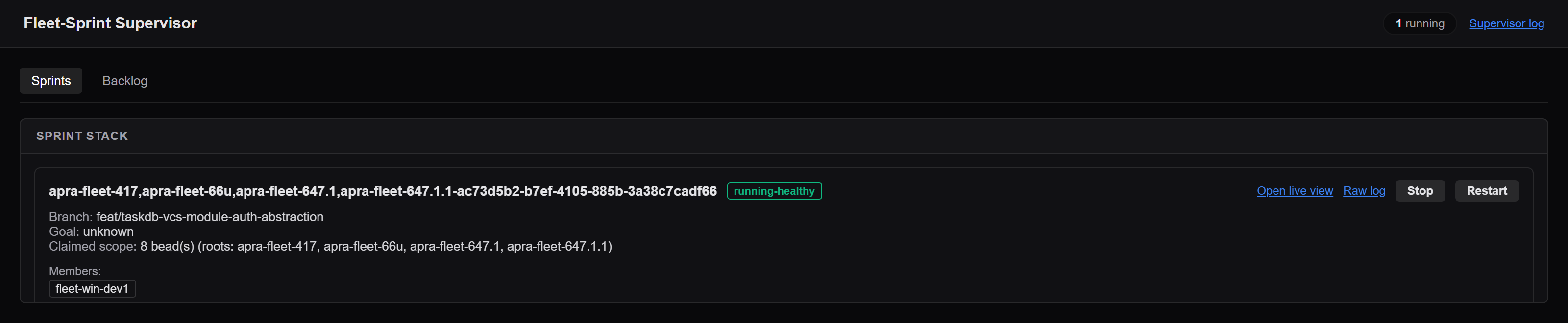
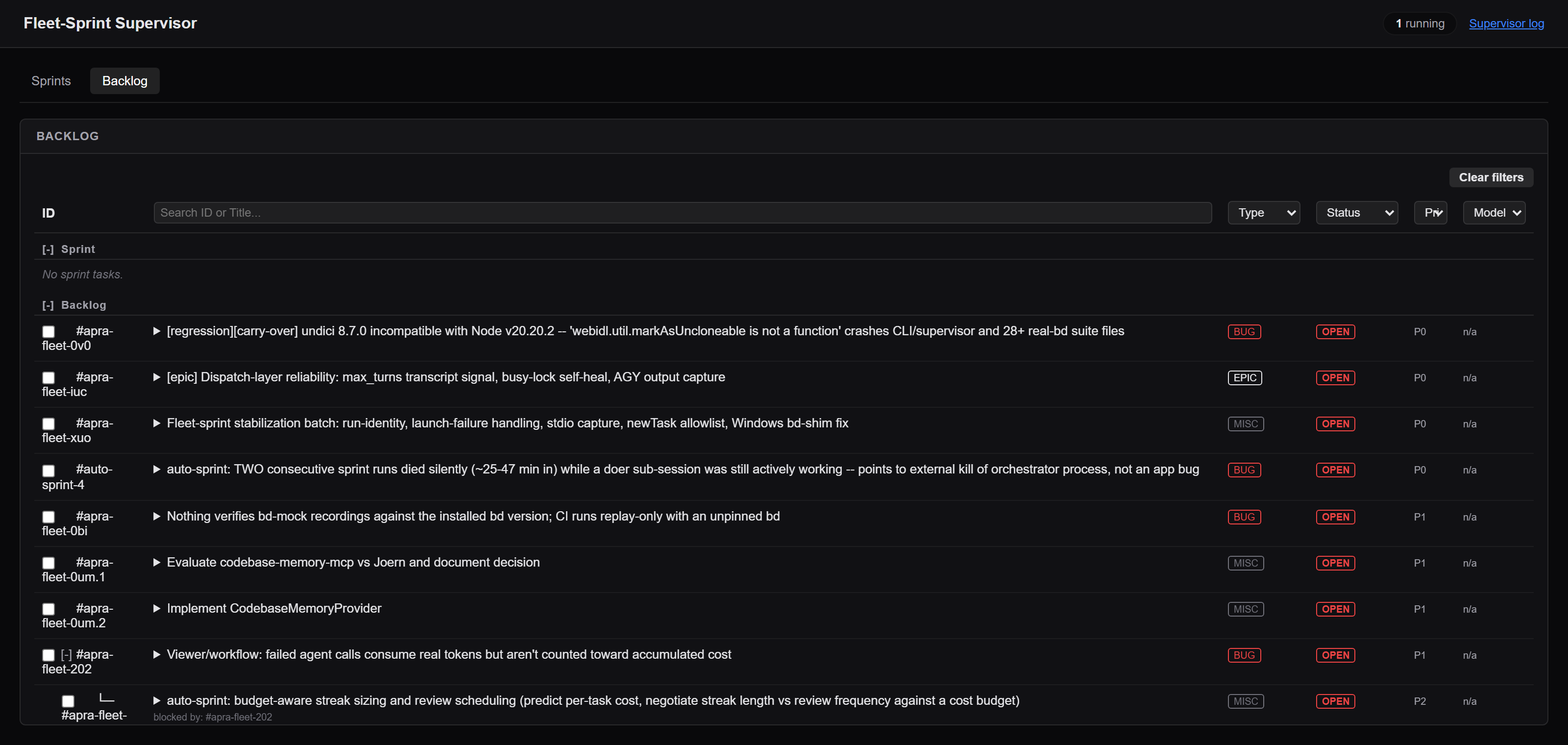
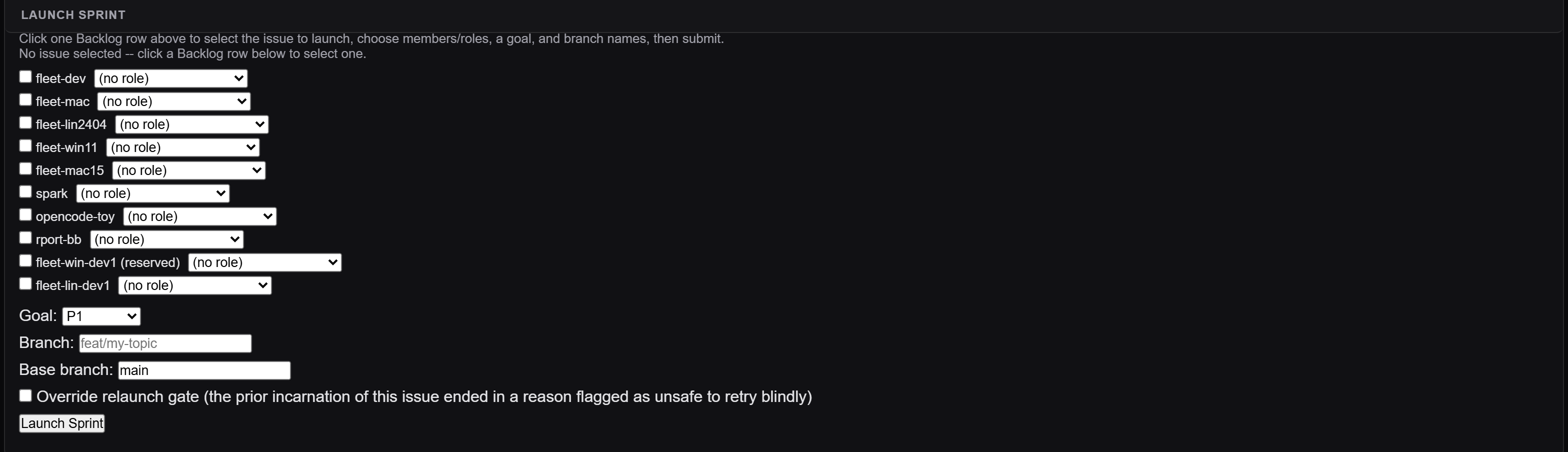
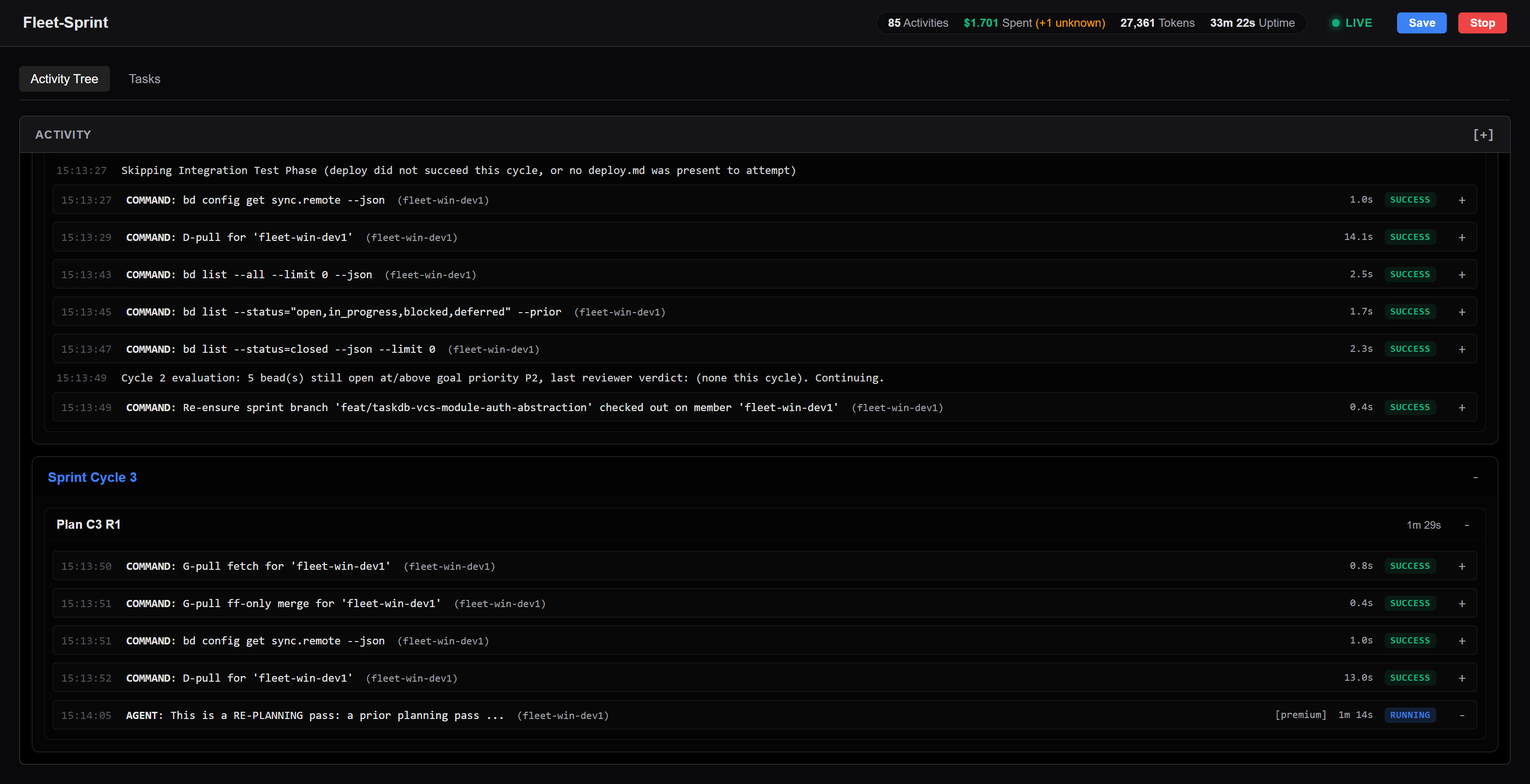
Clicking into a live sprint gives the per-sprint dashboard: phases and agent dispatches streaming in as they happen, token and dollar cost totals accruing live, a Stop button, a live rendering of the beads work graph (which tasks exist, which are in progress, which closed) and — at the end — a verdict badge (PASS in green, FAIL in red) with a direct link to the opened PR. Every sprint's raw output is also captured to a per-sprint log file linked from the dashboard, so even a run that crashes before reporting anything structured leaves a traceable trail.
A non-engineer can get real signal from a glance: how many sprints are running, whether any health badge is red, what the spend is so far, and — once finished — PASS or FAIL and a PR link. The deliverable a human ultimately reviews is that PR: reviewed commits, a verdict and cost breakdown stated plainly in the PR title/body, and a written sprint analysis document committed under docs/ on the branch (the cost breakdown is only in the PR body).
Section 5How do architecture decisions and conventions get communicated
There is no dedicated "architecture decision record" input to fleet-sprint. Here is what actually exists, verified against the code and the shipped role contracts, ordered by reach:
bd remember— durable knowledge, scoped to the roles that need it. Beads has a persistent-memory store:bd remember --key <key> "<one or two sentences>"writes an entry into the shared beads database, searchable viabd memories <keyword>. Every dispatched sprint role (planner, doer, reviewer, test runners, ...) reads it itself: its role prompt runsbd memories --json +all+andbd memories --json +<role>+(e.g.+doer+) before it starts work (--jsonbecause text output truncates long values). So the key decides who sees a memory:+all+:<slug>reaches every role,+<role>+:<slug>one role, and+<role1>+<role2>+:<slug>each listed role; an unscoped key reaches no role (full contract inpackages/apra-fleet-se/docs/role-contracts.md). The interactive session you launch and supervise sprints from is theorchestratorrole: no role prompt runs there, so give it its memories with a session-start hook (e.g. a Claude CodeSessionStarthook that prints+all+and+orchestrator+memories). If your repo's hooks run plainbd prime, every memory lands in every session regardless of scope; usebd prime --no-memoriesto keep sessions scoped. For standing direction like "all new endpoints go through the gateway service" or "no new runtime dependencies without approval", an+all+memory is the closest thing to a real cross-role channel that exists.- The requirements file (
requirementsFileon the launch request). The one explicit per-sprint channel: the engine reads the file and pastes its content verbatim into the planner's prompt. Use it for sprint-specific technical direction that should shape decomposition. Honest limit: it reaches the planner (and is readable by the harvester), not the doer — direction that implementers must follow needs mechanism 1 or 3. The file is read on the supervisor's machine by the sprint process, which runs from the supervisor's project folder: a relative path resolves there, and a file that is not found is only a warning in the run log (the planner runs without it). Use an absolute path when in doubt. - Bead descriptions and acceptance criteria. The highest-fidelity channel to the agents writing the code: the planner must give every task concrete acceptance criteria, the doer implements to them, the reviewer diffs against them. If a constraint matters for a specific piece of work, state it in that epic/feature bead's description and the planner carries it down into task criteria.
- The repo itself, including
CLAUDE.md. The planner's contract tells it to read key source files "to understand existing conventions and structure", and the reviewer explicitly checks for consistency "with existing patterns and conventions" — your codebase's existing shape is an input. And because roles run as Claude Code sessions in your repo, a projectCLAUDE.md(Claude Code's native project-instructions file) is loaded for every session — a Claude Code feature rather than a fleet-sprint one, but a real place to pin style rules and hard "never do X" constraints. - The runbooks.
deploy.mdand the playbooks encode operational decisions (how we deploy, what "healthy" means, what we verify) as enforced behavior, since agents execute them literally. - The Knowledge Bank (optional). If you use apra-fleet's KB for the repo, the engine adds a short knowledge block to role prompts. Only CONFIRMED entries that are not disputed (flagged for review or part of an open contradiction) are injected as knowledge; INFERRED and UNVERIFIED captures are not injected until they are promoted (the reviewer may be shown INFERRED entries as promotion candidates to verify, never as facts).
Rule of thumb: durable cross-cutting conventions -> bd remember under an +all+ or +<role>+ key (and CLAUDE.md as belt-and-suspenders); sprint-scoped direction -> the requirements file; per-work-item constraints -> bead acceptance criteria.
Section 6What fleet-sprint actually does for you vs. what you still own
| fleet-sprint does this for you | You still own this |
|---|---|
| Decomposes your epics into a reviewed task graph with dependencies and per-task model tiers (cost routing) | Curating the epic and its children in beads with real acceptance criteria — including pulling your AzDevOps or GitHub Issues backlog across (beads' own bd ado sync / bd github sync / bd import do the transport; the curation is yours) |
| Implements tasks: real commits on a branch, one per task, build/lint/unit checks run before each commit | Having a repo that builds; deciding product scope; recording architecture direction (bd remember, requirements file, bead descriptions, CLAUDE.md) |
| Independent AI code review against acceptance criteria, with reopen/redo loops applied deterministically by the engine | Final human review of the PR — the PR is never auto-merged, and the verdict is advice, not authority |
| Deploys and smoke-tests — by literally executing your runbook | Writing and maintaining deploy.md; keeping the CLI permission allowlist current (agents stop and report rather than self-granting) |
| Integration-verifies features with evidence, closes only what passes, files structured bugs for what fails | Writing integ-test-playbook.md (can start as manual verification steps) and deciding what "verified" means for your product |
| Once-per-sprint regression pass with sandbox lifecycle and carry-over bug filing | Writing regression-test-playbook.md; accepting that with zero existing tests, early sprints have thin regression coverage |
| Live dashboard: activity tree, cost in USD, health watchdog, stop control, raw logs | Watching it occasionally, and acting on a red badge or a FAIL verdict |
| Cost governance: per-task model tiers, optional USD budget ceiling, cost block rendered in the PR body | Setting the budget; paying the bill |
| Opens the PR with a plain PASS/FAIL verdict and a committed sprint analysis | Merging (or not), and everything that happens after merge — your CI, your release process |
| Guards against operational foot-guns: member/scope reservation conflicts, deterministic-failure relaunch refusal, validated launches | Running the supervisor and fleet server (and restarting the supervisor after an apra-fleet upgrade); registering members; provisioning git and LLM credentials |
The pattern in that table is consistent: fleet-sprint automates execution and verification against artifacts you author. Teams that invest a day or two in sharp acceptance criteria, an honest deploy.md, and a first-cut playbook get an autonomous loop that produces reviewable PRs with evidence attached. Teams that skip the authoring get a system that — to its credit — stops and tells them exactly which file or criterion is missing, rather than pretending. Start with one epic, one member, one sprint, and a small budget ceiling, and judge it by the first PR it opens.